LMN Crew App
ROLE
Product Designer
SCOPE
Research · Strategy · UX · Design System
PLATFORM
iOS & Android
AUDIENCE
Crew leads & Supervisors
Crews had to use the app, but they trusted paper more.

LMN makes business management software for landscaping companies. Their field app - meant to replace pen and paper jobsite operations for crew leads had become a burden to their crews in the field. Usage was inconsistent or lacking and the app added time to their day.
This was also included a complete rebrand. As LMN transitioned from 90s tech to modern software, so did their apps. New logos, new palette, and new brand story was built into a new design system.

A customer session to learn about their day-to-day operations.
Establishing workflows and building a customer baseline
The original app had no analytics and limited usage data. And core workflows had never been defined in detail before. It was important to establish what the baseline actually was. So before I touched a layout, I spent time with the people who knew most about the struggles with the app:
-
I ran working sessions with owners, supervisors, and crew leads to understand what a day in the life of a crew lead is and what the app needed to be to help support it.
-
I talked to internal stakeholders and customer support teams to understand how inefficient and broken workflows impact customer operations.
-
I analyzed Productboard insights, Pendo data and Dovetail recordings looking for patterns and themes, and written customer feedback helping provide operational context.

What I kept hearing wasn't just about missing features. It was about trust. Crews had built workarounds because the app was so complex; they'd stopped counting on it to work how they needed it to work.
Reliability and environmental ease had to come first.
Landscaping crews work outdoors, often in low or no signal, juggling multiple jobs in a single shift. The original app had a strict workflow: one job, one crew, full connectivity. That almost never matched reality.
The new design system library and color palette factored in environmental factors like sunshine, dirty hands, and spotty connection. The result was a collection of big buttons, big hit areas, big fonts, and a high-contrast palette that made it easier for crews to use the app - even offline.
-
That meant a purpose-built design system with high-contrast elements, large tap targets, and oversized type for use in nearly any weather condition
-
It meant an emphasis in offline-first architecture so the app worked where crews actually are
-
It meant rethinking time tracking from the ground up to support multi-job sessions, same-day repeat clock-ins, overnight shifts, and 24-hour timesheets

System components built with environmental and field usage in mind.

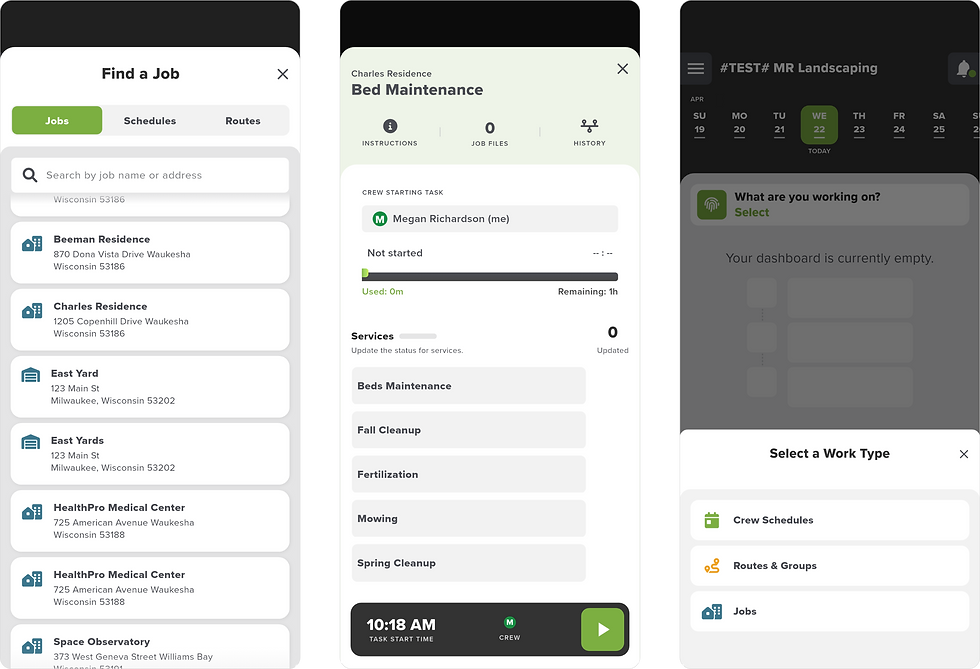
Colors and visual indicators tell users what is in progress, completed, or needs more attention at-a-glance
Once the foundation was solid, new features could flow naturally into the experience.
New feature: Photo Upload
Crews could now add multiple photos, notes, and tags, in a single workflow.
Task-level photo capture and material logging with GPS and timestamps gave operations a record they could use for billing disputes, client communications, and building their own portfolio.
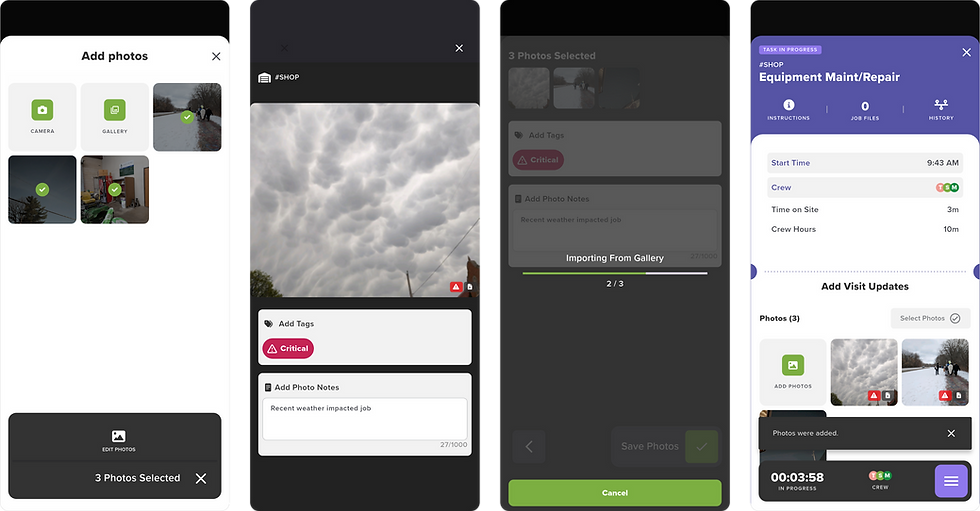
Clear, focused steps makes photo upload workflow quick and easy
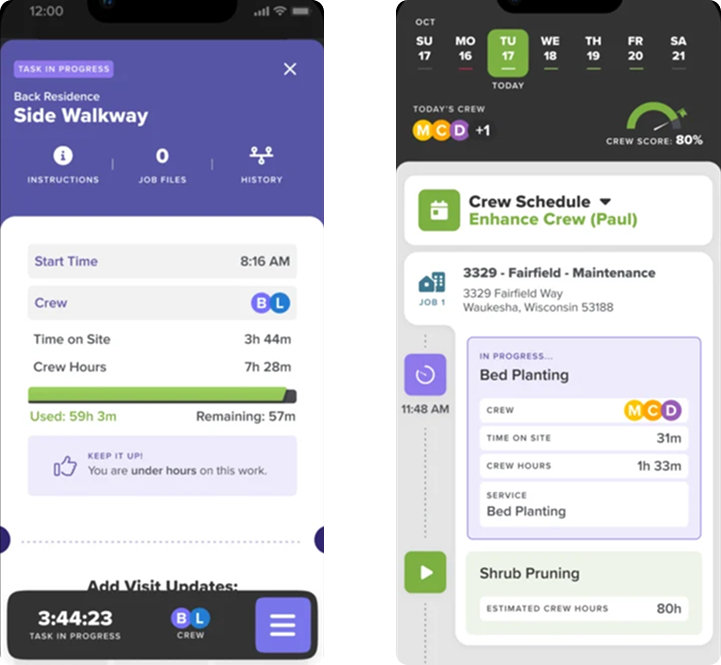
New feature: Estimated Values
Estimated (sold) values like crew hours and materials needed were surfaced across jobsites, tasks, and services, and crews could now see how they were tracking against the sold job in real time. This also helped sales, operations managers, and owners get a more accurate picture of job costing across different types of projects and tasks.
New feature: Training Platform Integration
An external webapp (Greenius) was integrated into the field app. Crews now had direct access to safety training natively in the same app rather than requiring a context switch to a separate platform.
Crews were able to finish more assigned training on time and demonstrate practical skills while already on the jobsite.

The redesign unified three user workflows - owners, supervisors, and crew leads - in a single app for the first time.
Streamlined workflows
Owners, supervisors, and crew leads on one led to more informed, efficient crews on jobsites
Offline-first
The app could now work anywhere they worked - with or without a signal, helping keep crews on the clock and billable
New app identity
A new design system built from a new brand story. LMN Crew was born.
Living records
GPS, timestamps, and photo records could be tied to every job, by default, improving the end customer experience